
Vinted Bot for Discord Alerts
Monitor new Vinted listings with unlimited custom filters. Monitorius sends matching deals directly to Discord so you can review them and react faster.
Offer and rating verified on August 13, 2026. Monitorius is independent and is not affiliated with, endorsed by or sponsored by Vinted.
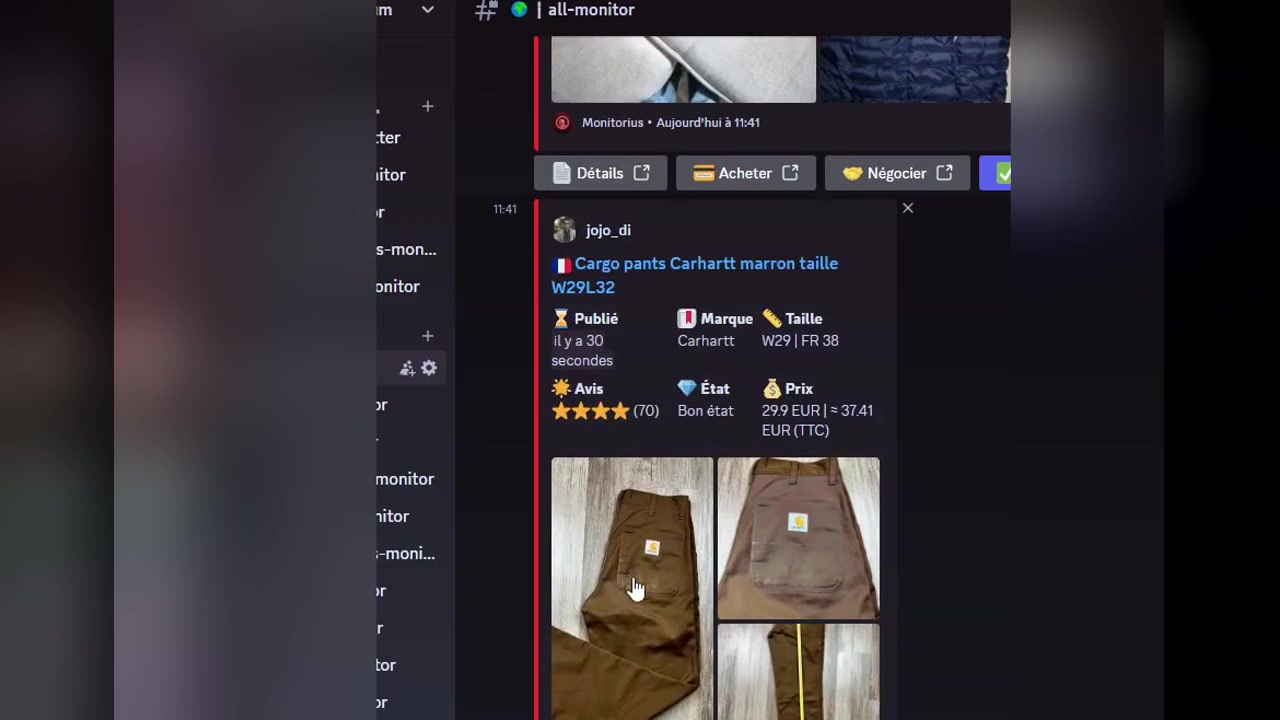
Product in action
See Monitorius in action
A newly detected Vinted listing appears in Discord with the listing details and the available actions in one focused alert.
Match detected
Your filters define which new listings matter.
Alert sent to Discord
Review the listing from the channel you already use.
Open and decide
Check the item and seller before taking any final action.
Core features
Faster, more focused Vinted monitoring
Configure precise searches, receive relevant listings in Discord and keep control over the final purchase decision.
Real-time alerts
Monitorius tracks new Vinted listings and sends matching offers when they are detected.
Unlimited custom filters
Create searches using brands, sizes, categories, prices and keywords.
Discord notifications
Review matching listings directly in Discord instead of repeating manual searches.
One-click purchasing
The official Whop offer lists Autobuy while keeping the final purchase decision with you.
Automated purchase attempt
Autocop can automate a reservation or purchase attempt. Final confirmation still requires your explicit approval.
Multiple Vinted markets
Whop currently lists France, Germany, Italy, Spain, the Netherlands and additional supported markets.
How it works
From search to Discord alert in four steps
Create your Vinted search
Define the product and criteria you want to monitor.
Configure your filters
Choose relevant brands, sizes, categories, prices or keywords.
Monitorius detects matches
Configured searches continue monitoring newly detected listings.
Receive the Discord alert
Open the listing, check the item and seller, then decide whether to proceed.
Built for resellers
Less searching. More relevant listings.
Verified feedback
Trusted by Vinted resellers
Three short reviews from the current official Whop listing.
“The unlimited filters are a major advantage.”
“The best bot for hunting on Vinted.”
“Perfect service.”
5.0 / 5 on Whop · Based on 6 ratings
Read verified reviews on WhopCurrent offer
Monitorius
€8 / week
- Real-time Vinted alerts
- Unlimited custom filters
- Discord delivery
- Autocop included
A 7-day free trial is currently available with code MONI. Confirm the live price, eligibility, renewal terms and included features on the official Whop checkout.
FAQ
Frequently asked questions
What is Monitorius?
Monitorius is a Vinted monitoring tool that sends matching new listings to Discord based on custom filters.
How fast are Vinted alerts?
Monitorius provides real-time alerts when matching listings are detected. No exact delivery time is guaranteed because availability and external services can vary.
Does Monitorius automatically buy Vinted items?
Monitorius includes Autocop, which can automate a reservation or purchase attempt when a listing matches your criteria. The final order is not confirmed without your explicit human approval.
Does Monitorius work with Discord?
Yes. Monitorius sends matching Vinted listings directly to Discord so you can review them from your chosen channel.
Which Vinted countries are supported?
The current Whop offer lists France, Germany, Italy, Spain, the Netherlands and additional markets. Check the official offer for the live list before subscribing.
How much does Monitorius cost?
The public offer currently starts at €8 per week. Confirm the live price and renewal terms on the official Whop checkout.
Is there a free trial?
Yes. Monitorius currently offers a 7-day free trial with code MONI; check the checkout for current eligibility and conditions.
Is Monitorius affiliated with Vinted?
No. Monitorius is an independent service and is not affiliated with, endorsed by or sponsored by Vinted.
Learn more
Vinted bot guides
Practical guidance for monitoring, alerts and careful resale workflows.
What is a Vinted bot?
Understand monitoring, alerts and automation limits. Guide 02Vinted alerts in Discord
Create more precise alert searches. Guide 03Vinted reselling guide
Build a careful sourcing and resale workflow. Guide 04Compare Vinted bots
Review alerts, filters, pricing clarity and buyer control.Trust and transparency
About Monitorius
Monitorius is an independent Vinted monitoring and editorial project led by founder Nathan Denel. Product information is checked against the live site, the official Whop offer and primary marketplace sources. Learn more about Monitorius, its author and verification method.
Ready when you are
Ready to monitor Vinted faster?
Set custom filters, receive matching listings in Discord and keep the final purchase decision under your control.